
Growing Up: A Life Simulation Adventure on Roblox
Overview
Growing Up is a free life simulation game available on the Roblox platform, developed by ScottSpiritWalker and originally released in 2017. Designed as a single-player experience, the game immerses players in the journey of a child progressing through life stages, completing daily tasks and milestones to grow older. The core purpose of the game is to simulate the gradual transition from childhood to adulthood through a series of structured, interactive events. Players take on the role of a young character who must fulfill various responsibilities—ranging from attending school and learning to drive, to caring for pets and celebrating birthday parties.
The game addresses the universal theme of personal growth and development, offering a nostalgic and reflective experience that appeals to both younger and older audiences. While it lacks multiplayer functionality, it compensates with a rich narrative arc and meaningful progression mechanics. The target users include Roblox players seeking a more mature, story-driven experience beyond typical multiplayer games. Real-world usage scenarios include practicing in-game skills such as skateboarding or driving, which may translate to improved performance in other Roblox titles. The game has maintained consistent popularity, with nearly 500 million plays and over 1.8 million favorites, indicating strong long-term engagement.
Key Features & Capabilities
- Progressive Life Stages – Players advance through childhood by completing age-specific tasks, each leading to a birthday celebration and a permanent increase in character age and level.
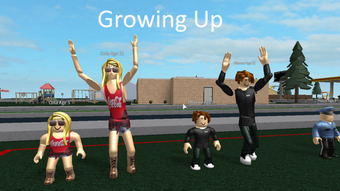
- Realistic Character Growth – The character physically grows taller with each birthday, providing a visual and emotional sense of accomplishment.
- Diverse Task System – Includes school attendance, pet care, learning to skateboard, and mastering driving mechanics, offering variety and skill development.
- Family-Centric Events – Birthday parties with family members reinforce emotional engagement and simulate real-life family interactions.
- Non-Linear Progression – Tasks are not strictly ordered, allowing players to explore different activities at their own pace.
Each feature contributes to a layered simulation experience that goes beyond simple entertainment. For instance, learning to drive in the game may help players build confidence in similar mechanics found in other Roblox games. The task variety ensures that the gameplay remains fresh, even over extended play sessions. The absence of a multiplayer component does not diminish the depth of individual experience, as the focus remains on personal development and emotional resonance.
User Interface, Workflow & Performance
The user interface of Growing Up is designed to align with the Roblox platform’s standard layout, ensuring intuitive navigation for users familiar with the ecosystem. The game’s workflow is linear in progression but flexible in execution, allowing players to choose which tasks to prioritize. Core actions such as feeding pets, attending school, or practicing skateboarding are triggered through simple interactions, minimizing the learning curve.
Performance is expected to be stable within the Roblox environment, given the game’s long-standing presence and consistent player base. The developer did not specify resource usage details, but Roblox’s optimized runtime typically manages memory and CPU usage efficiently. Stability is supported by the game’s longevity, with no reported widespread crashes or bugs. The game’s mechanics are designed to be responsive and reactive, maintaining smooth gameplay during task execution. While exact performance metrics were not provided, the game’s sustained popularity suggests reliable operation across a wide range of devices.
Compatibility & System Requirements
Growing Up is designed exclusively for the Roblox platform, which supports both Windows and Mac operating systems. The game’s installation size is listed at 100 MB, indicating a lightweight footprint. As a web-based application running within the Roblox client, it does not require standalone installation on a user’s device. Compatibility information was partially provided, with the game confirmed to function on systems capable of running the Roblox platform.
Exact system requirements were not listed, but users are expected to meet the minimum specifications for Roblox, including a modern browser, stable internet connection, and compatible hardware. The game does not require high-end graphics capabilities, making it accessible to a broad audience. No additional software or plugins are needed beyond the Roblox client. The developer did not provide information on mobile or console compatibility.
Pros and Cons
Pros
- Unique life simulation concept with strong emotional and visual progression
- Free to play with no in-app purchases or ads
- Longevity and sustained popularity with over 500 million plays
- Encourages skill development through realistic in-game tasks
- Simple, intuitive interface consistent with Roblox standards
Cons
- Limited to single-player experience with no multiplayer or social features
- No official updates or maintenance since 2017
- Dependent on Roblox platform for access and performance
- Visuals and mechanics remain unchanged since original release
- May feel outdated compared to newer Roblox titles
FAQ Section
Is Growing Up available on platforms other than Roblox?
Currently, the game is only accessible through the Roblox platform. There is no standalone version for Windows, Mac, or mobile devices.
Is the game safe to play?
As a game published on the official Roblox platform, Growing Up is subject to Roblox’s safety and moderation policies. It does not contain explicit content and is rated appropriate for general audiences.
Does the game require regular updates?
The game has not received any official updates since its release in 2017. However, it continues to function without issues due to its compatibility with the Roblox runtime.
What type of license does Growing Up have?
As a free game on Roblox, it is distributed under Roblox’s terms of service. It is not available for redistribution or modification outside the platform.
Can I play Growing Up offline?
No, the game requires an active internet connection to access the Roblox platform and run within the client environment.
Final Thoughts + CTA
Growing Up stands out as a rare gem in the Roblox ecosystem—a single-player life simulation that delivers depth, emotional resonance, and lasting replayability without relying on multiplayer dynamics. Despite its age, the game maintains relevance through its unique mechanics, nostalgic appeal, and strong player retention. While it lacks modern features like updates or social integration, its core design remains compelling and effective. The visual progression of the character, combined with meaningful tasks and family events, creates a sense of personal achievement that few games on the platform replicate.
For players seeking a thoughtful, skill-focused experience that reflects real-life milestones in a playful format, Growing Up is an exceptional choice. It’s ideal for those who appreciate simulation games, want to practice in-game skills, or simply enjoy a reflective journey through childhood. Its free status and platform accessibility further enhance its value.
Download Growing Up now and experience a life journey like no other on Roblox.







